Why Use Obsidian?
Obsidian is a note-taking application designed around the principle of linking ideas together. It doesn’t use folders the way traditional notebooks or apps do—instead, you create connections between notes using links. This mirrors how your brain actually stores and retrieves information: through relationships and associations.
In paramedicine, where fast thinking and accurate recall are critical, having a personal system for understanding and linking knowledge is a major advantage. Obsidian helps you create that system.
You do not need to be a tech expert. If you can type and use square brackets [[like this]], you can use Obsidian effectively.
An Obsidian setup/user guide is available here: Obsidian Setup & Use Guide
Core Features to Know
1. Plain Text Markdown Notes
Each note is just text. This means they are fast, lightweight, and won’t break. You don’t need to learn special formatting—just write.
2. Backlinking and Linking
You can connect notes by simply typing [[Note Title]]. This lets you build a network of knowledge, rather than isolated pieces. For example:
- [[Anaphylaxis Treatment]] links to [[Epinephrine Dosing]] and [[ALS PCS – Allergic Reaction Directive]]
- [[Shortness of Breath]] connects to [[Asthma]], [[COPD]], [[Pulmonary Embolism]], and [[CHF]]
3. Graph View (Optional)
Obsidian includes a visual map of how your notes connect. You don’t need to use this to be effective, but it can be helpful later on to see how your knowledge clusters.
How to Use Obsidian Effectively as a Student
Obsidian supports—and supercharges—the Zettelkasten workflow:
Step 1: Capture Fleeting Notes
Open a new note, title it with the date or class topic, and jot down anything interesting or confusing during lecture or lab.
Example:
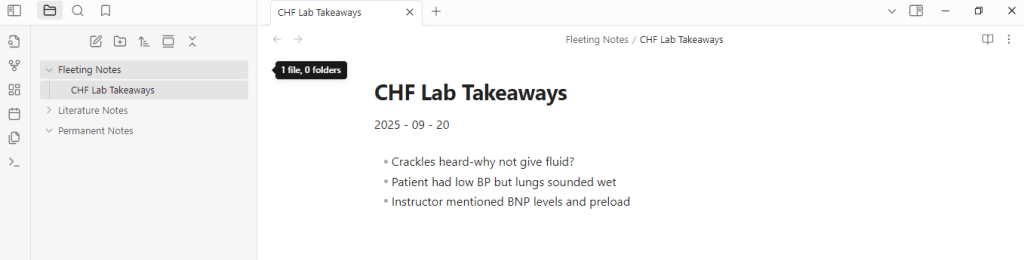
Step 2: Convert to Literature Notes
After class, create notes based on sources: lecture slides, readings, or the ALS PCS.
Example:

Step 3: Create Permanent Notes
Write atomic, precise, linkable insights.
Example:
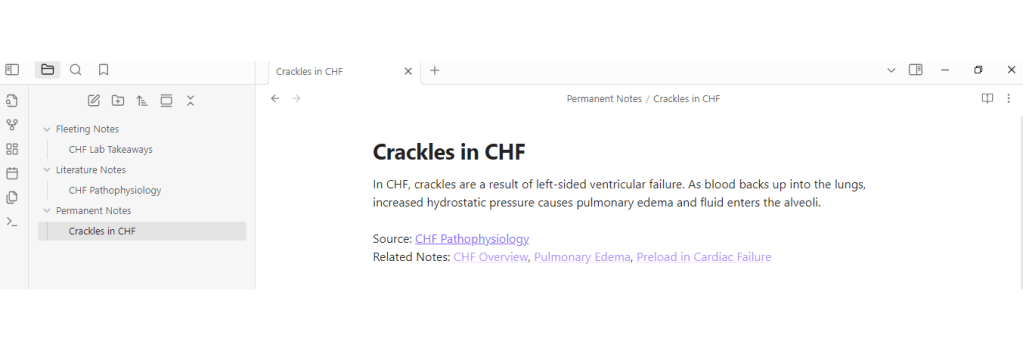
Repeat this with other symptoms, treatments, or medications you encounter. You now have a personalized, integrated knowledge system.
Using a Map of Content (MOC) in Obsidian
A Map of Content (MOC) is like a personalized index for a topic. It isn’t just a list of notes—it’s a dynamic hub that shows how your knowledge connects.
Instead of relying on folders, which separate things, MOCs help you pull related notes together in one place. They evolve as you learn more, just like your thinking.
What It Might Look Like
Here’s an example MOC for Cardiac:
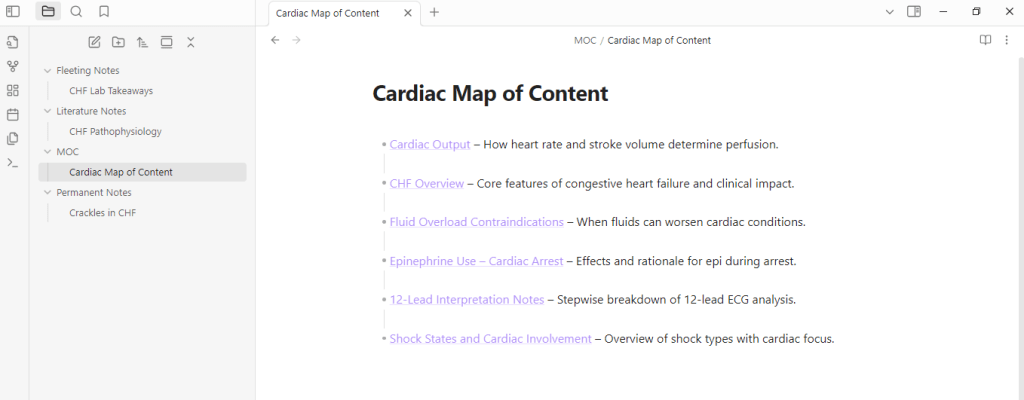
Each bullet links out to a full permanent note. You can also add short summaries beside the links or group them by concept (e.g., Assessment, Treatment, Pathophysiology).
How to Use It
- Create one MOC (note) per major subject: Airway, Cardiac, Neuro, OB, etc.
- Link new notes to it after you create them
- Update it weekly or after scenario days
- Use it for review: scan it before OSCEs or lab refreshers
This keeps your thinking organized by connection—not just storage. It’s your mental dashboard for a topic.
Real-World Example
You just finished a scenario on a 75-year-old patient with sudden shortness of breath and crackles. Here’s what you do:
- Capture Fleeting Note: “75M, SOB, crackles, low SpO2, refused fluids—CHF?”
- Review Protocol: ALS PCS says to avoid fluid bolus in suspected CHF.
- Create Literature Note: CHF can mimic respiratory distress—important to distinguish from pneumonia.
- Write Permanent Note: “CHF often misinterpreted as respiratory-only. Key indicators: crackles + orthopnea + JVD + Hx of HTN or MI.”
- Link Notes: Connect this to CHF, crackles, ALS PCS directives, and PE differential.
- Update MOC: Add this new note to your [[Cardiac Map of Content]] under “CHF Cases” or “Pulmonary Assessment Links” to keep your topic dashboard growing.
Daily Use Tips
- Open Obsidian for 5–10 minutes daily.
- After each lab or lecture, write at least 1 permanent note.
- Review and link older notes weekly.
- Don’t try to be perfect. Just be consistent.
Final Thoughts
Obsidian isn’t just a place to store notes. It’s a place to build understanding. It helps you:
- Think in systems
- See connections others miss
- Create your own clinical reference library
When you return to a note in 6 weeks and it still makes sense—that’s the sign of a strong system.
I. Learning Foundations
Build a strong system for thinking, studying, and remembering in high-pressure fields.
- Introduction: What This Guide Is and How to Use It
Overview of how to use VitalNotes as a toolset, not just a blog. Lays the groundwork for applying what you learn. - Learning How To Learn: Build Your Second Brain
Introduces the philosophy of externalizing your thinking and memory into a “second brain” using tools like Obsidian, Anki, and ChatGPT. - Anki for Clinical Recall
How to use Anki’s spaced repetition model to remember critical information like drugs, directives, and differentials. - Smart Notes with Obsidian
Learn to use Obsidian for linked thinking, case comparisons, and long-term concept retention with smart note strategies. - Using ChatGPT as a Study Tool
Prompts and strategies for using ChatGPT to simulate cases, quiz yourself, or clarify confusing concepts on demand. - The Pomodoro Technique for Paramedic Learning
Learn how to stay focused and avoid burnout using short, structured study blocks.
II. Practical Application
Move from theory to field-ready practice. These tools help bridge simulation, lab, and real calls.
- Scenario Days – Make Learning Stick
How to get more from scenario practice using repetition, debriefs, and learning loops. Turn repetition into retention. - Mastering Directive Decision-Making
A breakdown of how to use directives in real-time, with pattern recognition, logic triggers, and threshold thinking. - Reflecting Without Journaling
Not everyone journals—this guide offers quick, low-resistance alternatives to build metacognition through regular reflection. - Lab Integration Guide
Use lab sessions to build decision-making habits, not just check off skills. Includes scenario prep, debriefing, and error capture.
III. Clinical Reasoning
Develop clarity under pressure. These pages train your diagnostic eye, pattern sense, and mental workflow.
- Building a Clinical Mindset
Helps shift from passive protocol use to active clinical judgment. Includes strategies to slow your thinking and challenge assumptions. - Fast Pattern Recognition Builders
Drills and exercises to sharpen clinical intuition by contrasting similar presentations and exploring symptom variation. - Common Errors and How to Learn From Them
Lists the most frequent mistakes in labs and scenarios—then shows how to learn from each and correct your thinking path. - The Five Whys: A Simple Method for Better Clinical Thinking
Teaches the “Five Whys” method for exploring errors, confusing presentations, or misunderstood treatments in depth.
IV. Resources
Your support tools: guides, summaries, templates, and setup walkthroughs.
- Summary
Recap of the big ideas behind VitalNotes: learn reflectively, study actively, and build a system that supports decision-making under pressure. - Helpful Resources
Downloadables and quick-reference tools: directive cue sheets, Anki decks, debrief templates, and scenario aids. - Anki Setup & Use Guide
Step-by-step instructions for downloading, customizing, and optimizing Anki for long-term retention. - Obsidian Setup & Use Guide
How to build a clinical note vault in Obsidian: folder structures, templates, and linking strategies. - Sources and References
A list of research and literature that supports the methods taught in the blog, with commentary on their application to clinical learning.
 VitalNotes