Introduction
Anki is a powerful, free flashcard program that helps you remember facts efficiently by using spaced repetition, a technique proven to enhance long-term retention. Whether you’re studying drugs, directives, anatomy, or pathophysiology, Anki turns passive study into active recall.
1. Installing Anki
Desktop (Recommended)
- Go to: https://apps.ankiweb.net
- Download for Windows, macOS, or Linux
- Install and open Anki
Mobile (Optional)
- Android: Free on Google Play
- iOS: Paid version in App Store (“AnkiMobile”)
- Alternative: Use AnkiWeb via browser
Create AnkiWeb Account (for sync and backups)
- Register at: https://ankiweb.net/account/register
- In Anki: Go to
Tools > Preferences > Sync, and log in
2. How to Organize Your Decks
Create separate decks by topic or directive to keep things clean and focused.
Suggested Decks:
- ALS Medical Directives
- Pharmacology
- Trauma & Procedures
- Cardiology
- Pathophysiology
- Case Review & Scenarios
Subdecks can be created under major decks for specific areas (e.g., “ACS” under ALS).

3. Recommended Settings for Paramedic Students
These settings are optimized for short-, medium-, and long-term retention. Set them by clicking the gear icon next to a deck → Options.
When in doubt you can leave your settings to Default and change when you are more comfortable with the program.
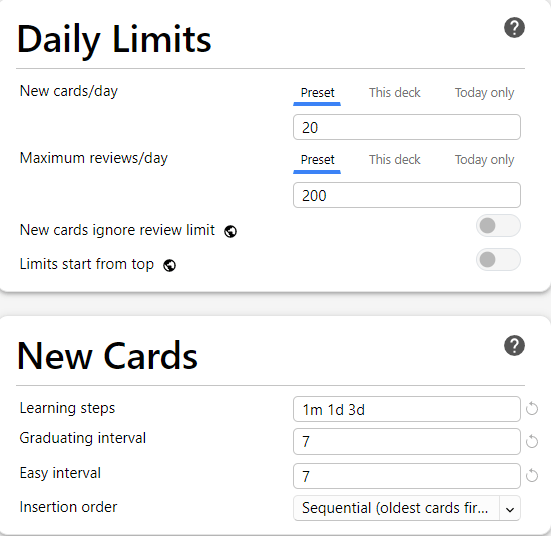
New Card Learning Settings
| Setting | Recommended Value | Why |
|---|---|---|
| New cards per day | 20–40 | Prevents overload and supports consistent learning |
| Learning steps (min) | 15 1440 4320 | Reinforces new info at 15 min, 1 day, and 3 days |
| Graduating interval | 7 days | First long-term recall after learning |
| Easy interval | 7 days | Longer interval if card feels easy |
| Starting ease | 250% | Leave default; controls ease growth curve |
| Order | Show new cards in order added | Helps follow course sequence |
| Bury related new cards | Enabled | Avoids seeing related cards back-to-back |
Review (Mature Card) Settings
| Setting | Recommended Value | Why |
|---|---|---|
| Maximum reviews/day | 100–200 | Balances review time with retention |
| Interval modifier | 100% | Maintains default scheduling |
| Easy bonus | 130% | Slight increase for easy-rated cards |
| Maximum interval | 36500 days (default) | Leave as-is |

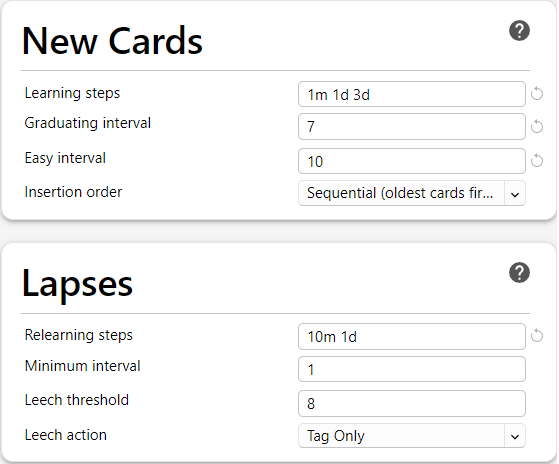
Lapse Settings (Forgotten Cards)
| Setting | Recommended Value | Why |
|---|---|---|
| Steps (in minutes) | 10 1440 | Relearn after 10 min and 1 day |
| New interval | 0% | Resets interval to rebuild memory |
| Leech threshold | 8 | Identifies poor cards for rewrite |
| Leech action | Tag Only | Highlights but doesn’t suspend cards |
Other Settings & Tips
| Setting | Recommendation | Why |
|---|---|---|
| Auto Sync | Enabled (on open/close) | Keeps progress backed up |
| Night Mode | Optional | Reduces eye strain |
| Graph View (Add-on) | Optional | Visualizes review history |
| FSRS Scheduler | Not recommended unless experienced | Advanced users only |
4. Creating Effective Flashcards
Basic Cards (Front → Back)
Use for simple Q&A: drug doses, vital ranges, definitions, etc.
Steps:
- Open Anki and click on the deck you want to add a card to.
- Click “Add” at the top of the screen.
- In the top-left dropdown menu (next to “Type”), make sure “Basic” is selected.
- Type your question in the “Front” field.
- Type the answer in the “Back” field.
- Click “Add” at the bottom of the window.

Cloze Cards (Fill-in-the-blank / Hidden Text)
Use for hiding key words or steps in a sentence, great for understanding and recall.
Steps:
- In Anki, click “Add.”
- From the “Type” dropdown, select “Cloze.”
- In the single text box (no Front/Back split), type a full sentence or phrase.
- Highlight the word(s) you want to hide and press Ctrl+Shift+C (or use the […] button).
- It will format the hidden word like this: {{c1::your hidden word here}}
- You can add multiple clozes per card if needed ({{c2::…}}, etc.).
- Click “Add” to save.

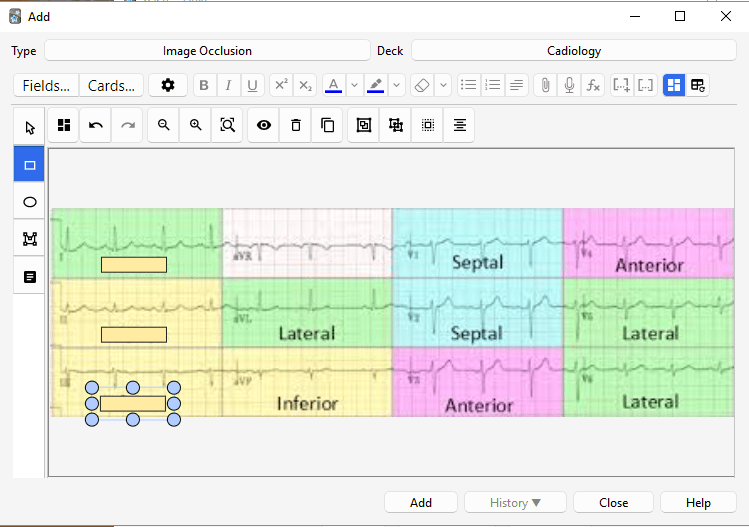
Image Occlusion (Hide parts of an image)
Use for diagrams, charts, ECGs, protocol tables, anatomy, etc.
Steps to Create:
- Click “Add.”
- Change “Type” to “Image Occlusion.”
- Click “Add Image” and upload a diagram or screenshot (e.g., ALS PCS page, anatomy label).
- The image will open in an editor. Use your mouse to draw boxes over the parts you want to hide.
- When you’re done, click “Hide All, Guess One” (or “Hide One, Guess One”) at the bottom.
- Add a note if desired, then click “Create” and close.
Tips for Great Cards
- Keep it one fact per card
- Use simple, clear language
- Avoid copying full paragraphs or lecture slides
- Reference sources (e.g., ALS PCS, protocols)
5. Example Cards
Basic Card:
- Front: What is the adult dose of ASA?
- Back: 160–162 mg chewed and swallowed
Cloze Card:
- Text: The contraindication to nitroglycerin is a systolic BP below {{c1::100 mmHg}}.
Image Occlusion:
- Upload ECG or anatomy image, block out key elements, and prompt identification
6. Best Practices for Use
- Review every day (5–20 mins is enough)
- Don’t cram—trust the spacing algorithm
- Add new cards immediately after class or study
- Use tags to group by week, topic, or directive
- Start a shared class deck to divide the work
7. Add-ons for Advanced Users (Optional)
To install: Tools > Add-ons > Get Add-ons
Useful Add-ons:
- Image Occlusion Enhanced (great for ECGs, anatomy)
- Hierarchical Tags (better organization)
- Review Heatmap (visual progress tracker)
- Advanced Browser (power user sorting and filters)
8. Using Anki for Exam and OSCE Prep
- Create decks for each directive
- Add cards for drug doses, contraindications, patch points, and procedures
- Practice ECGs, conditions, and trauma decision-making using cloze and image cards
- Use “Custom Study” to cram before exams if needed:
- Click gear icon > Custom Study > “Review ahead” or “Increase new cards”

9. Backup, Sync, and Maintenance
- Sync to AnkiWeb every day (automatically if enabled)
- Export decks regularly for backup (
File > Export) - Periodically run
Tools > Check Databaseto keep Anki fast
10. Getting Started Today
- Install Anki (desktop first)
- Create a deck called “ALS Directives”
- Add 3 cards based on today’s lecture
- Study daily—even 10 minutes helps
- Check back in 2 weeks and notice the improvement in your recall
Conclusion
Anki doesn’t work unless you do—but once you commit to daily use, it becomes one of the most powerful tools in your paramedic education arsenal. With a bit of setup and the right deck structure, you’ll build lasting memory on everything from cardiac protocols to obscure contraindications.
I. Learning Foundations
Build a strong system for thinking, studying, and remembering in high-pressure fields.
- Introduction: What This Guide Is and How to Use It
Overview of how to use VitalNotes as a toolset, not just a blog. Lays the groundwork for applying what you learn. - Learning How To Learn: Build Your Second Brain
Introduces the philosophy of externalizing your thinking and memory into a “second brain” using tools like Obsidian, Anki, and ChatGPT. - Anki for Clinical Recall
How to use Anki’s spaced repetition model to remember critical information like drugs, directives, and differentials. - Smart Notes with Obsidian
Learn to use Obsidian for linked thinking, case comparisons, and long-term concept retention with smart note strategies. - Using ChatGPT as a Study Tool
Prompts and strategies for using ChatGPT to simulate cases, quiz yourself, or clarify confusing concepts on demand. - The Pomodoro Technique for Paramedic Learning
Learn how to stay focused and avoid burnout using short, structured study blocks.
II. Practical Application
Move from theory to field-ready practice. These tools help bridge simulation, lab, and real calls.
- Scenario Days – Make Learning Stick
How to get more from scenario practice using repetition, debriefs, and learning loops. Turn repetition into retention. - Mastering Directive Decision-Making
A breakdown of how to use directives in real-time, with pattern recognition, logic triggers, and threshold thinking. - Reflecting Without Journaling
Not everyone journals—this guide offers quick, low-resistance alternatives to build metacognition through regular reflection. - Lab Integration Guide
Use lab sessions to build decision-making habits, not just check off skills. Includes scenario prep, debriefing, and error capture.
III. Clinical Reasoning
Develop clarity under pressure. These pages train your diagnostic eye, pattern sense, and mental workflow.
- Building a Clinical Mindset
Helps shift from passive protocol use to active clinical judgment. Includes strategies to slow your thinking and challenge assumptions. - Fast Pattern Recognition Builders
Drills and exercises to sharpen clinical intuition by contrasting similar presentations and exploring symptom variation. - Common Errors and How to Learn From Them
Lists the most frequent mistakes in labs and scenarios—then shows how to learn from each and correct your thinking path. - The Five Whys: A Simple Method for Better Clinical Thinking
Teaches the “Five Whys” method for exploring errors, confusing presentations, or misunderstood treatments in depth.
IV. Resources
Your support tools: guides, summaries, templates, and setup walkthroughs.
- Summary
Recap of the big ideas behind VitalNotes: learn reflectively, study actively, and build a system that supports decision-making under pressure. - Helpful Resources
Downloadables and quick-reference tools: directive cue sheets, Anki decks, debrief templates, and scenario aids. - Anki Setup & Use Guide
Step-by-step instructions for downloading, customizing, and optimizing Anki for long-term retention. - Obsidian Setup & Use Guide
How to build a clinical note vault in Obsidian: folder structures, templates, and linking strategies. - Sources and References
A list of research and literature that supports the methods taught in the blog, with commentary on their application to clinical learning.
 VitalNotes